How to show popups when people try to exit your website
Yes, its annoying when people try people leave your website. So today I will show you How to show popups when visitors try to leave your website. This will be super useful, especially if you are running an ecommerce website. That being said, with this method I will show you how to show popups when people try to leave any kind of website. It could be a WordPress website or shopify store or even in Magento application.
To show exit popups you can add a service such as OptiMonk or OptinMonster. After that you can design the popups in the dashboard. From there you can set which pages you want exit popups to appear.
What is OptiMonk and OptinMonster?
OptiMonk and OptinMonster are both powerful popups showing service that you can add to any website. With these tools you can show popups ads not only on page exists, But also on many different conditions. You can manually define rules very easily that allows you to configure when to show popups. On ecommerce websites,, these tools have increased the engagement of sites by 500% or more also. You can read the success story of OptiMonk here and the success story of OptinMonster at here.
The reason you should use these over custom building a exit popup is the ease of use with the lot of highly tested converting templates. The OptiMonk has hundreds of tested templates that you can easily plug and play. The best part about OptiMonk is that you can use OptiMonk for completely free until you get more than 15,000 views per month. Basically at that point you will be generating a good income from the OptiMonk popups itself.
The OptinMonster is also a great and is widely used in industry. But the issue with it is pricing. OptinMonster is not free, and it doesn’t offer a free version (or a “freemium” plan). The cheapest plan starts with $14/mo, and in that plan also they have a limit of 2,500 page views.
OptiMonk VS OptinMonster
Features
OptiMonk
OptinMonster
Exit Popup
Available
Available
Pricing
Free Until you get 15,000 (Views/Month)
Starts with $14/mo until you get <2,500 Views
Countdown Timer
A more advanced timer with many option
Limited but necessary option are there
Support
Unlimited Support with free installation on your website
Limited Support
OptiMonk vs OptinMonster
QUICK NOTE:- OptiMonk is cheaper until you get 100,000 pageviews per month. When you hit that limit OptiMonk charges $79/ month, while OptinMonster charges $49/ month (Normally its 80 dollar, but as of now there is a sale in which you can get for $49/mo)
How to show popups when visitors try to leave your website using OptiMonk?
2. Install OptiMonk on your website (You add JavaScript code or just use a plugin)
3. Go to campaigns and click create new & design your exit popup
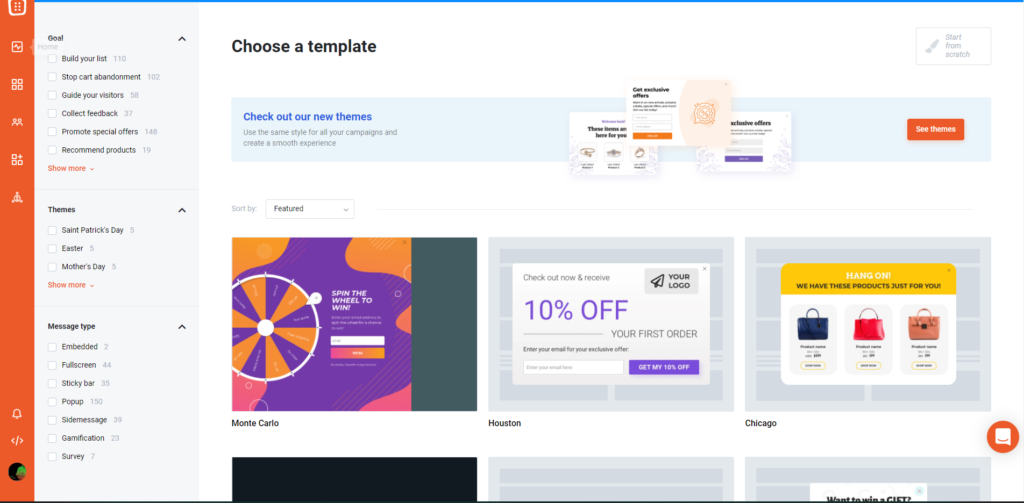
In here you can click chose a template for the exit popup. On the left side you will see options to filter the templates. Select the template you want in your exit popup.
4. Set the popup to appear on page exit
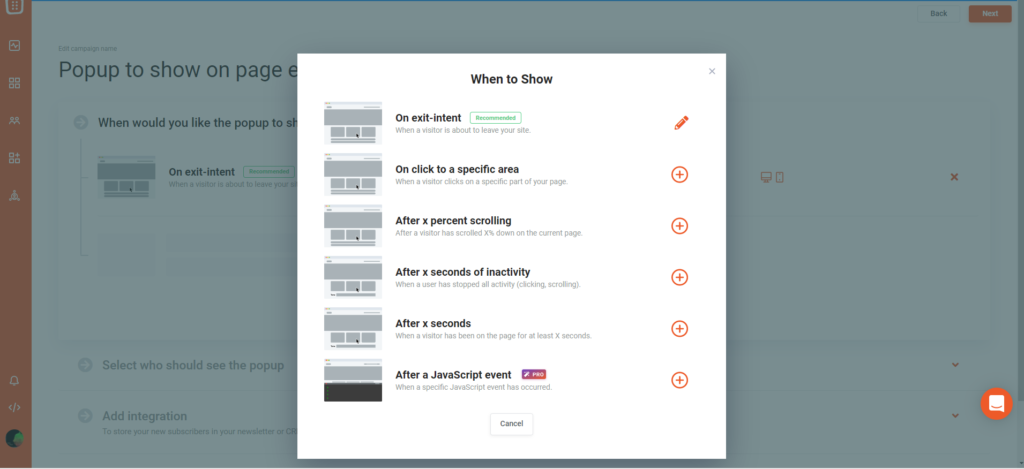
Once you design and click next, you will be prompt with option on when to show the popup. In here ensure that “On exit-Intent” is select.
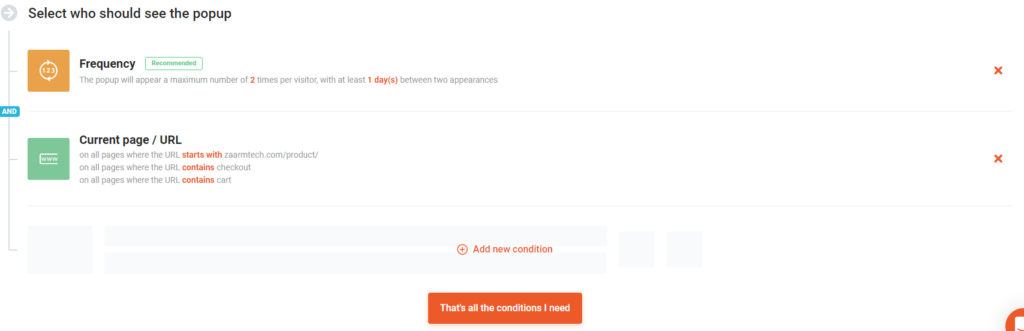
In here you can also set the option to show the exit popup only when visitors are exiting a specific page in your website.
5. Activate your campaign
Once your finish design & conditions, go to your dashboard and check if the campaign is active. If it is not just toggle button to activate the popup.
6. Check the popup on your website
How to show popups when visitors try to leave your website using OptinMonster?
1. Sign up to OptinMonster and Add it to your website
As I have explained for OptiMonk, when you sign up you will see the code that you need to add to your website. Also OptinMonster has plugin for WordPress and other platform. You will see this information when you sign up.
2. Create your campaign & design it
In this step also, you can select a template as we did before. Design the popup the way you want it to be.
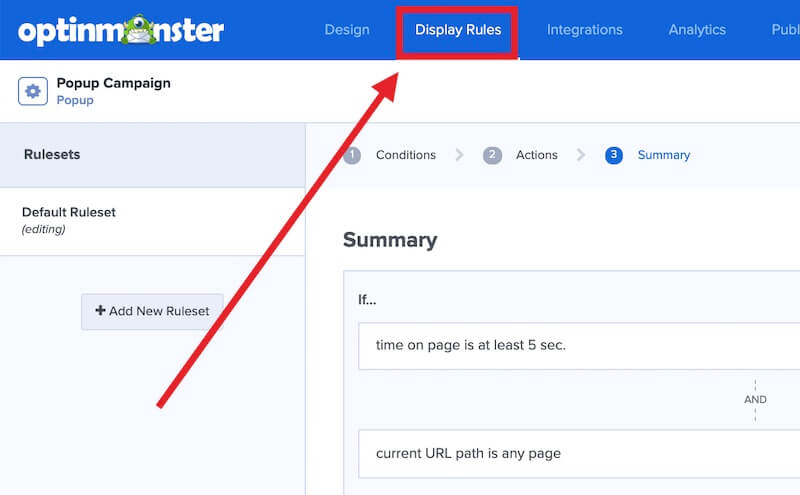
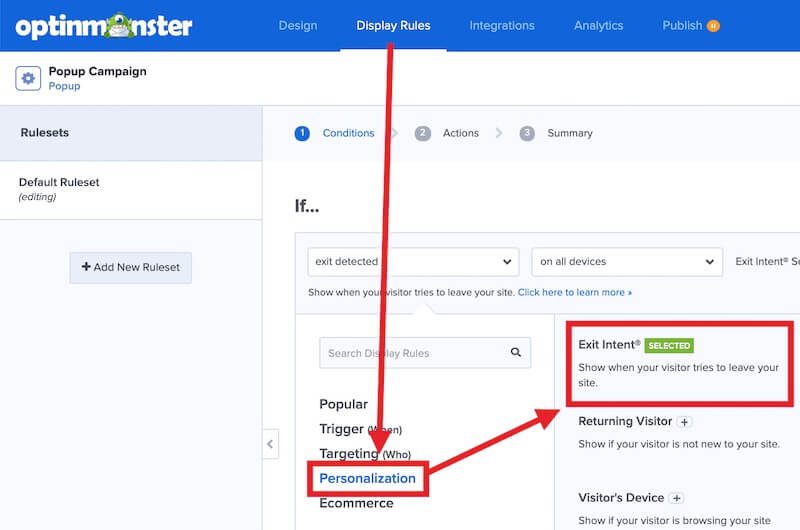
3. Go to the display rules in the campaign
4. Add exit intent as the rule to the ruleset
5. Click the save button & see it live on your website
Show popups when people try to exit your website
Now if you did everything as explained above, you will see the exit popup when you try to exit the website
Why I choose OptiMonk over OptinMonster
Basically its the pricing, and support I get from optimonk. Pricing is a huge factor, but also the personally I can say that support at optimonk is awesome. I have contacted them regarding some of my campaign they were always there to help me. Furthermore, the GUI and simplicity to find features are super simple. So if you ask me for recommendation, Surely I will suggest OptiMonk
Now that you’ve decided to take the plunge and become a solopreneur by starting your own business, you might be feeling more than a little overwhelmed by the sheer number of items on your to-do list. Don’t despair. Help is available if you know where to look and how to put together a team of tech support and freelancers to get your business off the ground and keep it flying smoothly. To day we will talk about How to Find Help as a Solopreneur
Forming Your Business
One of the first items on your list is likely forming your business, and this is also one of the first things you may need some help with. The rules and regulations for registering businesses are complex and vary by state. If you want to set up a limited liability company (LLC), for instance, there are affordable business formation services online that can help you file your paperwork and provide all the required documents. Using one can save you time and money.
Handling Computer Issues
Since so much business is done online these days, make sure you have an efficient computer system. Unless you’re a computer whiz, consider hiring a technician to set up your computers and keep them running. Having someone to call when your computer goes offline or your printer gets tied up in knots will give you peace of mind.
Managing the Books
Your business’ finances can get tricky. While you may be excellent at running your business and maintaining the best quality products and services for your customers, you may not be all that great at keeping track of your income and expenses, much less figuring out the complexities of the tax system. Consider hiring a freelance bookkeeper to make sure your books are accurate and complete. Visit a freelancer job site like Upwork, and look through some profiles. Read customer reviews, too, and make sure that the bookkeeper you choose has the experience and skills you need.
Marketing Your Wares
Getting the word out about your business can be a challenge, and you may discover that you need some help in this area. You could hire a web developer to create an eye-catching website for your company or a freelance writer to produce advertising copy, blog posts, or product descriptions. If you want a website feel free to send an email to admin@zaarmtech.com to get a quotation of a website for your online business. Even think about reaching out to a freelance marketing specialist to put together a whole campaign. This could save you some stress and give your business a major boost.
Keeping Yourself Organized
Finally, as a solopreneur, you probably have a packed schedule and more tasks on your agenda than you can keep track of. Before you pull your hair out, consider hiring a virtual assistant to keep you organized. There are several online companies that specialize in connecting virtual assistants and clients, and your assistant can do everything from managing emails to scheduling meetings to doing data entry.
Flourishing as a Solopreneur
Life as a solopreneur can be hectic, but you can flourish in a business that you love if you know where to turn for help.
Don’t hesitate to get tech support and freelance assistance from Zaarm Tech when you need it.
What if you need everything from scracth
Ok, You might be wondering what the above subheading said. What I mean is lets try to see how to build an business from scratch. The below video contains what you need and how you can start an online business from scratch. Feel free to check this video.
Now a days its a trend to create vertical short video’s for platforms like tiktok, YouTube Shorts or Instagram Reels. Today I will go through a python script that creates automated tiktok video in python. Everyone like when its automated. You do not need to do any work, Just run the script, and you get a video to post to your favorite platform.
To create automated tiktok video in python, all you need to do is run this script, that generates both video and thumbnail. With this script you can generate quiz, did you know, facts video’s and many more.
What features do this automated video generator have?
This script is focused on generating the everything you need to post to tiktok or youtube shorts. This mean this automated video generator will give you a video and a thumbnail for you to post to platforms you like.
The main features of this script include:
Generate Video
Generate High Quality Thumbnail
Add Voice Over
Add Background Music
Change Video Duration
How does this script work?
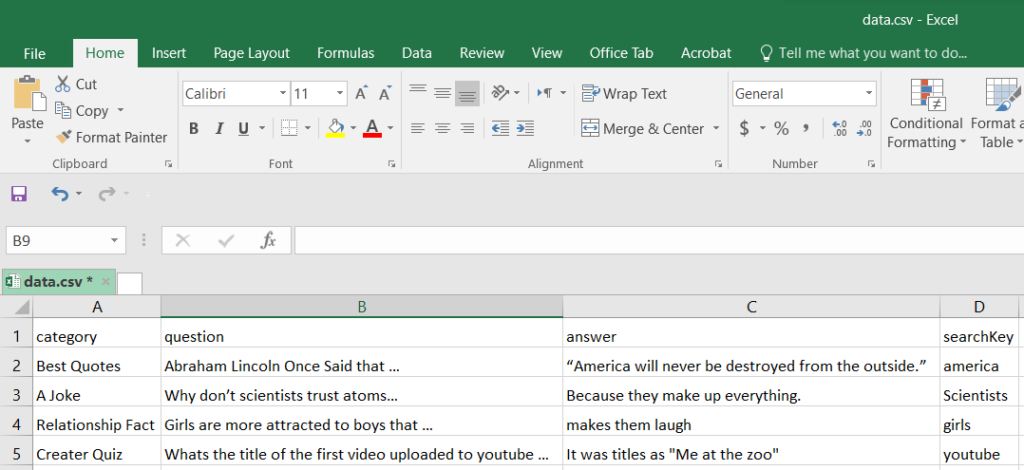
This python script will use a file called data.csv as the information needed to generate the video. This sheet contain 4 column, the category, question, answer and searchKey column. The category column contains a heading that will be used at top of the video and thumbnail. The question is the main text that will popup when you start the video. After 7 seconds, the text in answer column will popup. I think now you get the idea of how this is going to work. The searchKey column contains the keyword related to the video. With the text in searchKey column, the script will fetch images and video for the image from pixabay.
The pixabay is a great website that provides Stunning free images & royalty free video’s. This mean that photo and video from pixabay can be used in video’s that we monetrize. You can full write to use this video and images. It wont create any problem with tiktok or youtube monetarization. The best part is that, you do not even need to give credit to the pixabay or owner. But it is always nice to mention them in the description and thank them.
On the “main.py” go to editVideo function. On that function you can see that I have set the clip duration to 16 seconds. Just change the 16 seconds to what ever the number you wish. As a result, the average duration of the clip will increase. But if you change the total duration, also be sure to edit the Question and Answer duration
Just below the Clip you can see a new variable called “heading_clip”. In here also I have called “.set_duration(16)”. This mean that the heading of the video (category in data.csv) will be in the video for 16 seconds. You can always adjust this amount to be shorter or not.
Again you can see the both question clip and answer clip. In here using the set_duration I have set the duration of the Question and Answer. The answer will popup on screen right after the question duration is over. So to make the video perfect, its best to keep in mind.
How to generate automated thumbnail?
A sample of a thumbnail generated using this script
The above is a sample of a thumbnail that will be generated using this script. The script will take your question as the main text in the thumbnail. But with a single line of code you can change this. This script will be very easy for you to modify if you have any knowledge of programming. Always remember that you can contact admin@zaarmtech.com to get the support you need. Like I mentioned above, The image is fetched from pixabay using the searchKey from data.csv file.
How to add the background music?
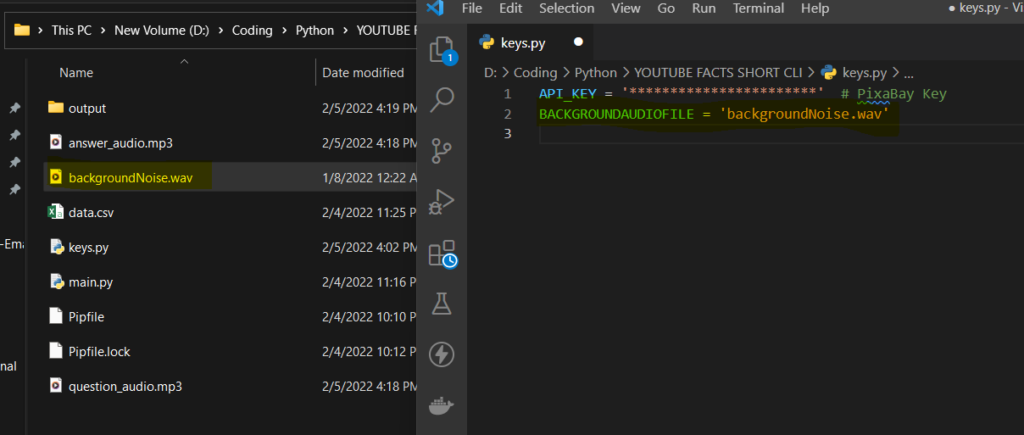
On the current directory you can see a file named “keys.py”. On the second line of this script there is a variable named “BACKGROUNDAUDIOFILE”. Add the name of the background music file to this variable. You can add a longer music file also. The script will automatically take only the required length of this audio based on the duration of video file. This audio will be played in the background during the whole video.
If you know the python programming language, you can edit this audio file to adjust the volume and the duration if you wish. But as for the demonstration of this tutorial I will be keeping this in this way, which is much simpler.
Which language does this automated script is coded on?
This script is coded on python. Python is very popular programming language, which is known for automation tasks like this. The main library used in this youtube automation script is moviepy. Moviepy is a python library used for editing video’s in python. Other than moviepy I have used other libraries such as requests, pillow. Requests is used to fetch the images and video’s from pixabay. The thumbnail that you see generated is done mainly used with the pillow library. If you want to know about this script visit to our facebook messenger inbox. We will be more than happy to share details.
Can I monetarize a YouTube channel with this script?
The short answer is that you can earn money by posting YouTube Shorts. YouTube has created a shorts funds to value creators. To earn money from YouTube shorts you do not need to be in YouTube Partnership Program. The YouTube Shorts Fund is a $100M fund to reward creators for their dedication to making creative, original Shorts that delight the YouTube community. YouTube will reach out to thousands of creators each month to tell them that they qualify for a Shorts bonus from the fund.
Other than earning from YouTube shorts funds, you can use YouTube shorts to promote promote products. My YouTube channel is about 1 thousand subscribers as of now, but still I get brand deals to my inbox, without having to ask or promote. Other than that YouTube shorts is a great traffic source for websites and affiliate products.
You can also use YouTube shorts to boost your YouTube channel subscribers. Because of the way YouTube shorts shelf is designed, its very easy to subscribe to YouTube channels. If you want your channel to blow up, YouTube shorts is the place.
This YouTube Shorts Generator Script is worth hundred’s of dollars, because with this script YouTube script you can built an automated YouTube Shorts Channel that pays you a lot more than this. But Today I am giving you this script for less than $50 dollars.
The script itself wont make your channel explode. The most important thing is to keep posting daily. YouTube loves creators who post daily and its fair to say that, If you start posting daily the YouTube algorithm will start promoting your content for you.
To get this software click the “add to cart” button and go checkout. If you have any problem downloading, send us a chat message using the messenger icon at bottom right corner.
To make money, you need traffic. What a better way to reach thousands of people in a single click by posting to a facebook groups. Today, we will show you how to make money with facebook groups, even if you are not a owner of facebook groups. You can just post to facebook groups and make money.
Best methods to make money with Facebook groups
Affiliate Marketing
Sell a Product
Earn per Click
Sell a Service using Saas
Print on Demand (shirts, cup etc…)
Other than this also there is a lot of ways to make money, but these are best and top 5 working methods.
Post to multiple facebook groups at once
If you want to make money with facebook groups, then you need to post to lot of facebook groups to start earnings. Its very difficult to achieve this with two or three groups. But please do not spam and always post to facebook groups that are relevant to what you are posting.
Posting to each and everyone group by might be little time consuming and boring, this is why we have created a new software called facebook group poster pro. This software can post the same thing to multiple groups automatically once its been configured. So if you like this, check it below. It has a free version and a paid one.
In the affiliate marketing you will be promoting some one’s product or service. And whenever some one clicks or buy a product or service using your affiliate link, you will get paid.
Many of the products or services have an affiliate program, But as you will be using many affiliate products and service, its advisable for you to join a affiliate network. In the below list you can find what the best 2 affiliate networks that I have worked with.
Click Bank:- probably you heard about, Click bank is not a product, it’s an affiliate network where you can find thousands of products to promote.
CJ Affiliate:- CJ is also one of the largest Affiliate Networks available Online. I do work with CJ, and I promote some Web hosting services like Contabo and Other products.
ShareASale:- Th shareasale is also same as the both mentioned above. When you sign up to shareasale, you will get a lot of affiliate products to promote as its a affiliate network.
These 3 website might not have the products that your facebook groups will be interested in. In that case go to the websites of the products and service that your audience will love, and sign up for their affiliate program. Mostly you can find their affiliate program details on their website.
After registering to the affiliate program of a product or service, you will get an affiliate link. Post this link to facebook groups and when they purchase, you will get a commission. This is one of the easiest way to make money with facebook groups.
Important Tip:- If you have a website, its better to take them to the website, where then can sign up to some sorts of email list. To create an email list you can use a service like MailChimp, GetResponse or system.io
In the affiliate marketing, you will be promoting someone else product or service. This is not bad, because you do not need to worry about the product or service. But the downside is that in affiliate marketing you will get paid a percentage of the product. You wont get the full amount. But if you are the one who owns the product, you can sell it for any price that you like and keep all the profit to your self.
What could you sell?
You might be wondering I do not have product or service that I can offer to people. Well, its time to start a one. If you are good at a service, usually a service that you can provide online will be better. Furthermore, the most common idea is to create a book by taking a simple article from a website. For this you can use the Canva, which has many templates to start with. You can also buy products from online stores such as eBay, AliExpress or amazon and sell it for a higher price.
How do I accept payments and show my product or service details?
You can get a website, settle all these things. Contact our team to get a quotation for website, if you do not know how to make a one. But if you do not have a website please do a consider a click funnels. If you just focus on selling a product, click funnels are much better than a website. With a click funnel you can attract more customers and chance for the sales will be so high. Its the best one, if you are focused on selling a product or service. Please complete the 5 day lead challenge to get started on this.
When you share a link in facebook groups, and someone opens it, you might get paid. Yes, I just said it in simple terms. What actually need to happen is that, you will share a link which will be shortened using a service like shrinkEarn. When people click it they will be taken to website where, there are ads and a continue button. So when they click continue, then they will be redirected to the actual website that you want them to be. This is great, when you are giving things for free. This way you can earn some, without the customer having to actually pay.
How much can you get paid per view?
That really depends on the country of the visitor. In high tier countries like Greenland you can get paid up to $20 per 1000 views.
The below contains the important info about shrinkEarn
Minimum Payout: $3
Payment Frequency: Daily
Payment Methods: PayPal, WebMoney, Payeer, AirTm, PaySera, Perfect Money, Paytm, GooglePay, UPI and Bank Transfer
Package Description / Country
Earnings per 1000 Views
Desktop
Tablet/Mobile
Greenland
$20.000
$20.000
Iceland
$13.000
$13.000
San Marino
$10.000
$10.000
Gibraltar
$7.000
$7.000
United Kingdom
$7.000
$7.000
Canada
$7.000
$7.000
United States
$7.000
$7.000
Andorra
$7.000
$7.000
Australia
$6.000
$6.000
New Zealand
$6.000
$6.000
France
$5.000
$5.000
Germany
$5.000
$5.000
Denmark
$4.000
$4.000
Saudi Arabia
$4.000
$4.000
United Arab Emirates
$4.000
$4.000
Brazil
$4.000
$4.000
Norway
$4.000
$4.000
Singapore
$4.000
$4.000
Spain
$4.000
$4.000
Thailand
$4.000
$4.000
Sweden
$4.000
$4.000
Italy
$4.000
$4.000
Mexico
$4.000
$4.000
Philippines
$4.000
$4.000
Indonesia
$3.510
$3.510
India
$3.510
$3.510
Worldwide Deal(All Countries)
$3.500
$3.500
WHY VIEWS/STATISTICS/EARNINGS ARE NOT COUNTING?
Visitors must be unique within a 24 hours.
Visitors must reach their destination page.
Visitors must have JavaScript enabled.
Visitors must have Cookies enabled.
4. Sell a service using Saas
The Saas stands for Software as a service. I think you have seen a lot of websites online like pdf convertors or tools or service that are similar to that. The basic idea is to create a website like that and put some ads like google ads or ezoic ads. After that with the help of tools like facebook group poster pro, you can get a huge traffic to the website. The Saas are more profitable in the long run, because people will always come back to your website for that service over time. Please watch this video and this video on how to build a website.
If you do not have programming knowledge, you can buy a script or a website from code canyon and put it online. If you need any help, we are always an email away.
5. Print on Demand
I the print on demand, You will be designing shirts and other products and selling this. If you are in a facebook group of a series or movie, You can create quotes on products and sell that product by posting to those facebook groups. You can also add vector images to items and sell it.
To achieve this the most common website is merch by amazon. Merch by amazon is for anyone who wants to create, promote, and market branded merchandise on Amazon with no risk and no up-front costs. On the Teespring also you can get started for completely free. They have a nice interface and drag and drop builder to create item in minutes.
Conclusion
So basically on each of the above method you will be getting a specific link. By posting that link to facebook groups, you will start getting paid, based on the method you chose above. When you are posting please do not post to random groups as it will not work. Check the interesting topic for people in the particular group and post only those related to that groups. To automate the posting, you can use facebook group poster pro.
Just In case if you want to get all your facebook group links, or the id of the groups, You can use this tool (which will be introduced to later in this blog post) to get those information to a excel or csv file. We have made this process so easy. This tool also extract name, description and even the icon of the facebook groups you have joined.
To Extract facebook group links, run the app and sign in to your facebook account in the opened chrome window. Then on the app, click extract button and see that all your Facebooks group details written to a csv file created at the same directory as program.
What details Can I Extract from facebook groups?
This tool we created have basically 2 option when it comes to extracting facebook groups. The first one only extract the links of facebook groups you have joined to a text (txt) file. We added this option because, this format is required to use in our facebook group poster pro. However, if you are extracting for that program, we recommend to select the option described below.
The second option which can be selected in the tool, will extract name, description, icon photo link and the link to the group itself to a csv (excel) file. This option contains everything we offer to extract in this program. If you want a custom extractor contact us, so we can quote a price.
How to use facebook group extractor?
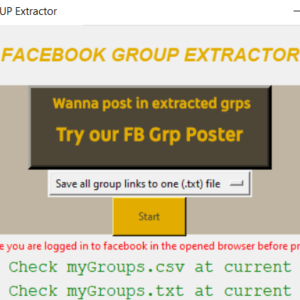
The facebook groups extractor is a simple software, All you need to do is select the option you would like (we described available 2 options above) and click start. To be honest you would not need a video guide, but here is a full guide video for you.
Video Guide
How to extract facebook group icon?
The software extracts the facebook group icon links to a csv file. The csv file will contain the direct icon as png or jpeg file. It will be a link to icon. Paste the link in any browser and you will be redirected to the icon. Now you can right click and save the icon as an image file.
Manually downloading each icon might be time consuming. With a simple script and the csv file you can automate this task in minutes. At the moment we do not have a separate tutorial for that, but hopefully we will but a one soon.
Click the above Add to cart button to download this software. Right now the software is not for free, But there is a chance you can get it for free. Earn the free points and use those points to pay for the software. This software is eligible for refund, under the terms and condition.
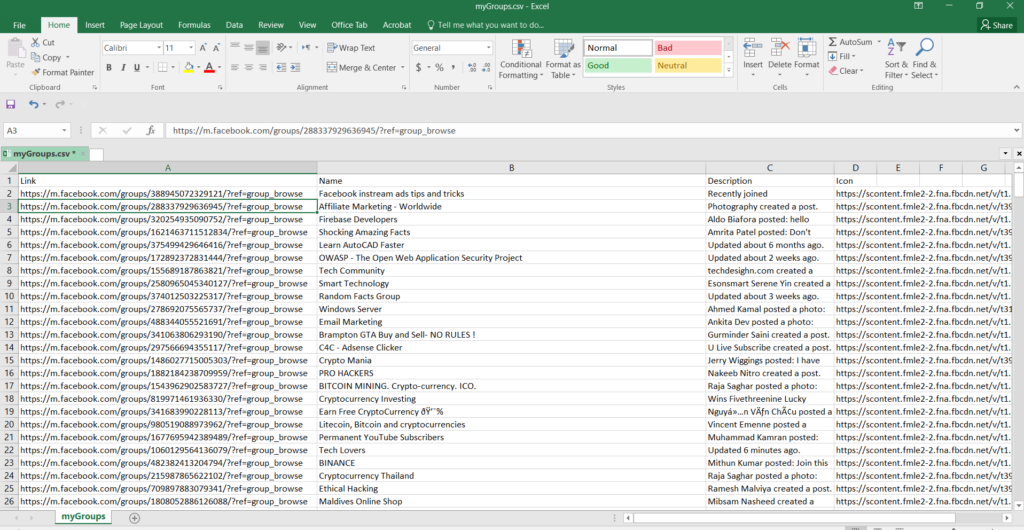
How does the extracted csv file look like?
How to extract facebook groups
The extracted csv file will contains rows and columns with the details of the groups you have joined. This program will only extract the details from the groups you have joined only. Once the program finishes extracting the facebook groups, you can open the csv file and edit the csv to any way you want. For example you can use the find and replace tool in excel to extract the only id of the group by editing the link field.